

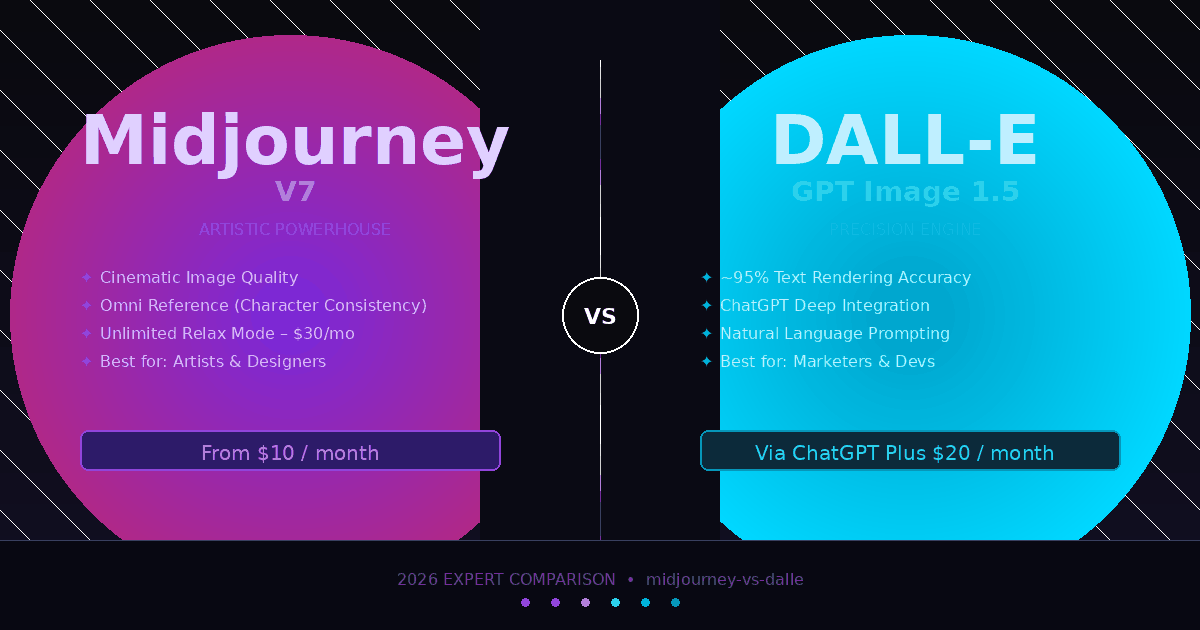
You’ve seen the debate everywhere: Midjourney vs DALL-E — which one should you actually use in 2026?
Here’s the problem. Most comparisons are outdated. Midjourney launched V7 in April 2025. OpenAI retired the DALL-E brand entirely and replaced it with GPT Image 1.5 in December 2025. The two tools are more different than ever — and choosing the wrong one is costing creators real time and money.
I spent weeks testing both platforms across dozens of prompts, use cases, and workflow scenarios. This article breaks down exactly what each tool does best, where each falls short, and which one makes the most sense for your specific goals.
What Midjourney and DALL-E Actually Are in 2026
Before comparing features, it helps to understand what each platform has become — because both have changed significantly.
Midjourney V7 is the current default model as of 2026. Born inside Discord, it has since expanded to a dedicated web app and mobile interface. Midjourney is an independent company with under 100 employees, no external venture capital, and an estimated $500 million in annual recurring revenue. That is not a typo. V7 builds on the aesthetic strengths of its predecessors and adds Omni Reference — a character consistency system that lets you maintain the same face, outfit, or subject across multiple generations. This is the feature professional concept artists, brand designers, and illustrators have wanted for years.
DALL-E (now GPT Image 1.5) is no longer a standalone product. OpenAI deprecated the DALL-E 2 and DALL-E 3 APIs in May 2026 and folded image generation directly into the GPT ecosystem. GPT Image 1.5 is a natively multimodal model — it generates images inside ChatGPT conversations rather than through a separate image pipeline. The result is a tool with dramatically improved prompt accuracy and near-flawless text rendering, but one that is deeply tied to the ChatGPT interface and subscription.
The core philosophical split: Midjourney is a dedicated creative tool built by people who obsess over visual quality. GPT Image 1.5 is a utility layer built by a company that wants image generation to be part of every workflow.
Image Quality: Where Each Tool Wins and Loses
This is the question everyone wants answered. The honest answer is that neither tool wins across the board — they excel in completely different categories.
Artistic Quality and Photorealism
In my testing, Midjourney V7 produces images that look like they were shot on a high-end camera by someone who actually studied composition. The cinematic lighting, skin texture detail, and sense of depth are genuinely difficult to replicate with any other tool on the market. You get images with what photographers call “presence” — a quality that is hard to define but immediately obvious when you see it. Concept artists, editorial illustrators, and social media creatives consistently rate Midjourney as the top tool for pure aesthetic output.
GPT Image 1.5 produces clean, bright, technically accurate images. Think product renders, infographic illustrations, and explainer visuals. The output is polished, but it can feel clinical compared to Midjourney’s results. One way to think about it: GPT Image 1.5 gives you a sharp, well-lit photograph. Midjourney gives you a cinematic still.
Winner for artistic quality: Midjourney V7
Text Rendering Inside Images
This is where GPT Image 1.5 is in a completely different league. Text rendering accuracy sits at approximately 95% — making it the clear choice for any image that requires legible words, logos, banners, or UI mockups baked into the visual. If you have ever tried to generate an image with readable text in older AI tools, you know how painful that process used to be. GPT Image 1.5 has essentially solved this problem.
Midjourney still struggles with accurate text placement and rendering inside generated images. It is not impossible, but it is unreliable enough that professionals avoid using it for any text-heavy composition.
Winner for text rendering: GPT Image 1.5
Prompt Adherence and Complex Instructions
I tested both tools with multi-element prompts — things like “a red leather briefcase on a wooden desk next to a steaming coffee cup, morning sunlight from the left, shallow depth of field, film grain.” GPT Image 1.5, inheriting DALL-E 3’s instruction-following architecture and GPT-4’s language understanding, executes multi-part prompts more faithfully. It forgets fewer details and places elements more precisely.
Midjourney sometimes takes creative liberties with complex prompts. This is occasionally a feature — it interprets prompts with artistic judgment — but it can frustrate users who need pixel-perfect adherence to a brief.
Winner for prompt adherence: GPT Image 1.5
Character and Style Consistency
Midjourney’s Omni Reference system is a game-changer for brand work and storytelling. You can use a reference image to maintain consistent character appearance across an entire campaign or comic series. This is not a minor improvement — it solves one of the most persistent practical problems in AI image generation for commercial use.
GPT Image 1.5 handles in-session consistency reasonably well through conversation history, but lacks a formal cross-session reference system. Once you close the chat, you are essentially starting from scratch with character appearance.
Winner for consistency: Midjourney V7
Pricing, Plans, and Real Cost Analysis
Here is where the comparison gets interesting, because the sticker price does not tell the full story.
Midjourney Pricing (2026)
Midjourney uses a subscription-only model. There is no free tier.
- Basic plan: $10/month — approximately 200 Fast mode generations
- Standard plan: $30/month — 15 hours of Fast mode plus unlimited Relaxed mode generations
- Pro plan: $60/month — more Fast hours, Stealth mode for private generation
- Mega plan: $120/month — maximum Fast hours, ideal for high-volume professional work
Annual billing applies a 20% discount across all plans, bringing Basic down to $8/month. For teams generating more than 500 images per month, Midjourney’s subscription model typically costs 40–60% less per image than pay-per-use alternatives.
GPT Image 1.5 / DALL-E Pricing (2026)
GPT Image 1.5 is bundled into ChatGPT Plus at $20/month. That subscription also includes GPT-4 access, web browsing, and every other ChatGPT feature. Image generation is capped at approximately 50 images per three-hour window, which is sufficient for most casual and moderate professional use.
For developers and high-volume teams, OpenAI charges per image through the API, with pricing tiered by resolution and quality settings, starting at around $0.04 per image for standard output.
The Real-World Cost Calculation
For casual users generating under 100 images per month, the choice is simpler than it looks. GPT Image 1.5 through ChatGPT Plus at $20/month makes financial sense if you already use ChatGPT for other tasks — you get image generation as a bonus. If you only want image generation, Midjourney’s $10/month Basic plan is the more affordable starting point.
For high-volume creative professionals, Midjourney’s Standard plan at $30/month with unlimited Relaxed generations is the better value. Relaxed mode is slower, but “slower” means one to four minutes per image — not hours.
For enterprise teams needing API access and automated workflows, GPT Image 1.5’s API integration is significantly easier to deploy than Midjourney’s current setup, which still requires Discord interaction or third-party wrappers for full automation.
Ease of Use, Workflow, and Who Each Tool Is Actually For
Learning Curve
GPT Image 1.5 wins on accessibility without question. You open ChatGPT, type a description in plain English, and get an image. You can then say “make the background darker” or “change the shirt to blue” in natural language. There are no parameters to learn, no syntax to master, and no new interface to navigate.
Midjourney has a steeper learning curve. While the web app has improved the onboarding experience dramatically compared to the Discord-only days, power users still learn parameter flags like --ar for aspect ratio, --stylize for artistic interpretation, and --chaos for variation. The upside: once you learn the system, you have a level of creative control that conversational prompting simply cannot match.
Platform Integration
GPT Image 1.5’s deepest advantage is its integration with the broader OpenAI ecosystem. If your team already uses ChatGPT for writing, research, or analysis, adding image generation requires zero new tools. For marketers, educators, and content teams working inside existing ChatGPT workflows, this integration removes real friction.
Midjourney operates as a standalone platform. It does not connect natively to productivity suites, CRM systems, or content management platforms without third-party tools. This is not a problem for individual creators, but it matters for enterprise teams building automated image pipelines.
Speed
I found that GPT Image 1.5 generates images in roughly 8–12 seconds. Midjourney’s Turbo Mode delivers in 15–30 seconds, but the standard queue can stretch during peak hours. For bulk production work, GPT Image 1.5’s consistent generation speed gives it a practical edge — in one documented enterprise test, it processed 50 product visualization requests in 12 minutes versus 28 minutes for Midjourney due to queue delays.
Common Mistakes Creators Make When Choosing Between These Tools
Choosing Midjourney for Text-Heavy Work
This is the most expensive mistake I see. Marketing teams spend $30–60 per month on Midjourney Pro and then struggle to generate a simple product banner with readable text. GPT Image 1.5’s near-perfect text rendering makes it the obvious choice for social ads, product mockups, UI illustrations, and any image where words need to be legible. Using Midjourney for this work is fighting the tool.
Choosing GPT Image 1.5 for High-End Portfolio Work
Conversely, photographers, concept artists, and illustrators who want portfolio-quality output often underestimate how much the visual gap matters. GPT Image 1.5 produces technically correct images. Midjourney produces visually striking ones. If the final deliverable is a campaign visual, book cover, or editorial illustration, the difference is immediately visible to clients and art directors.
Assuming the Free Tier Is Enough
GPT Image 1.5’s free ChatGPT access allows limited daily image generation. In my testing, serious creative work — iterating on a concept across 20–30 variations — burns through free limits quickly. Anyone doing professional image work should budget for a paid plan from day one.
Ignoring the Consistency Problem for Brand Work
Many small business owners use AI image generation for brand assets and then discover — too late — that their brand character looks different in every image. Midjourney’s Omni Reference solves this directly. If visual brand consistency matters for your use case, this feature alone is worth the subscription cost.
Conflating “Better” with “Better for Your Use Case”
Both tools sit at the top of their respective strengths. GPT Image 1.5 ranked number one on LM Arena’s image benchmark with an ELO score of 1264. Midjourney V7 is the aesthetic gold standard by consensus among professional visual artists. “Which is better” is the wrong question. “Which is better for what I am trying to do” is the right one.
Read More: Expert Picks: Best AI Background Remover Tools
Frequently Asked Questions
Is Midjourney or DALL-E better for beginners? GPT Image 1.5 (accessed through ChatGPT) is significantly easier for beginners. You describe what you want in plain English with no special syntax, parameters, or platform-specific knowledge required. Midjourney produces higher-quality artistic results but requires learning its interface and parameter system before you can consistently get great outputs.
Can DALL-E generate images for free in 2026? Limited free access is available through the free ChatGPT tier, which allows a small number of daily image generations with GPT Image 1.5. For consistent professional use, the ChatGPT Plus subscription at $20/month is effectively required. Midjourney no longer offers any free trial or free tier as of 2026.
Which tool is better for commercial use? Both tools grant commercial rights to images generated under paid plans. However, neither provides the copyright indemnification that Adobe Firefly offers. For regulated industries or clients with strict IP requirements, that distinction matters. For most creative commercial work — social media, marketing materials, concept art — both Midjourney and GPT Image 1.5 are commercially usable. For a wider look at options built around business use cases specifically, see our guide to the best AI image generators for business.
How does Midjourney V7 differ from previous versions? Midjourney V7, released in April 2025, extends the platform’s lead on pure aesthetic quality and adds Omni Reference for consistent character generation across sessions. Earlier versions like V5 and V6 were already market leaders for visual quality, but V7 closes the gap on practical commercial use cases that required consistent subjects.
Can I use both tools together? Yes, and many professional creative teams do exactly this. A common workflow uses Midjourney for hero images, campaign visuals, and anything requiring artistic quality — then uses GPT Image 1.5 for social post variations, text overlay graphics, product mockups, and any image needing precise prompt adherence. Using the right tool for each task produces better results than forcing one tool to do everything.
Does Midjourney have an API? As of 2026, Midjourney does not offer an official public API. Enterprise teams requiring automated image workflows typically use third-party API wrappers, which adds integration overhead. GPT Image 1.5 has a fully documented API through OpenAI’s platform, making it significantly more practical for automated pipelines and product integrations.
Which AI image generator produces more realistic photos? Midjourney V7 leads for photorealistic image quality in most head-to-head evaluations, particularly for human subjects, environments, and product shots requiring cinematic quality. GPT Image 1.5 produces clean, accurate photorealism that is technically excellent but often described as feeling more sterile or synthetic compared to Midjourney’s output.
Conclusion: Which Tool Should You Choose?
The Midjourney vs DALL-E decision in 2026 is genuinely straightforward once you are honest about your use case.
Choose Midjourney V7 if you are a concept artist, illustrator, brand designer, or social media creator who needs the highest possible visual quality and character consistency. The $10/month Basic plan gets you started, and the Standard plan at $30/month is one of the best values in professional creative tools.
Choose GPT Image 1.5 if you need text rendering inside images, natural language workflow integration, API access for automation, or beginner-friendly onboarding. At $20/month via ChatGPT Plus, you get image generation plus every other OpenAI capability in one subscription.
Use both if your creative output spans different content types. Marketing teams producing both brand campaigns (Midjourney) and product social content with text overlays (GPT Image 1.5) get the best results by running them in parallel. If your content also includes video, our roundup of the best AI video editing tools is the natural next step.
The only real mistake is picking one based on brand recognition alone. Test both against your actual prompts and production needs — the right answer will be obvious within a day of genuine use.
Ready for more? Return to our frontpage hub and keep the momentum going.
